


 Atlantic Mage Tower Annex
 Sea Witch Tavern
 Hearthfire Village
 Magincian Zokalo
Skill & Stat Management
Return to: Skills, General and Stats
| Attributes | Gain Systems| Limits| List | Scroll Binder| Scroll of Power | Stats Calculator | Skill & Stat Management | Titles & Order | Training |
| Stat and Skill Management | |||||||||||||||||||||||||||||||||||||||||||||||||||||||||||||||||||||||||||||||||||||||||||||||||||||||||||||||||||||||||||||||||||||||||||||||||||||||||||||||||||||||||||||
Skill & Stat Caps, by Xena DragonSo you are curious about the Skill and Stat Caps? These caps were put in place to even the playing field for newer players and people who didn’t have all day to spend practicing their skills and raising their attributes. A character that was 18 months old would be godlike, with GM Status in every skill and 100s for Strength, Dexterity and Intelligence, without the Caps because this character would have months and months to train.The Stat and Skill Caps were not put into place to inconvenience you or make your life miserable. They were put in place as a way to force boundaries upon characters that would normally run rampant over the countryside slaying everything in their wake if they were given no limits. With the addition of the Scrolls of Power, players now have a way to specialize their characters even more, and even train their stats a little bit higher than others to make things more “interesting”.
Stat Management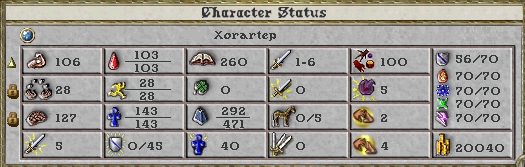 Each individual stat, Strength, Dexterity and Intelligence, can be set to either one of these three options: Each individual stat, Strength, Dexterity and Intelligence, can be set to either one of these three options:
Total stats are capped at 225 for new accounts. At 6 months, all characters will have their stat cap raised by 5 points to 230. Also, Scrolls of Power can be found to raise your stat cap by up to 25 points. Individual stats are capped at 150*.
– Only when a player character advances in a skill or is at the skill cap for that skill, he/she may gain a stat point.
– All skills now have a primary and secondary stat. The primary stat will rise 75% of the time. The secondary stat will rise 25% of the time. If the primary stat is not set to “gain”, the secondary stat will be chosen. If the primary and secondary stats are both locked or set to “decrease”, neither stat will rise.
Note: If a stat is at the maximum individual stat cap of 125 and is not locked, it can be chosen, but it will not rise.
– The chance that a stat will increase on any given skill gain is 1 in 20.
– Purchasing skill training from an NPC will not raise stats.
– There is no cap on how many stat points you can gain in any given time period
* Individual stats are capped at 125 real with a total cap of 150 including bonuses from items.
Table of Primary and Secondary Stats
Skill ManagementThere is a maximum total number of skill points you can possess among all your skills, called your skill cap. You are able to manage your skills by setting each skill to one of three modes: raise, lower, or lock. To manage your skills, click on the Skills button in your Character Window (paperdoll). On the far right of each individual skill there is an arrow pointing up, pointing down or a padlock. Click on it to cycle through the modes. If you have reached the skill cap and all of your skills are marked with either Raise or Lock, you can not train in a skill with an NPC.
A field at the bottom of the skill menu lists your character’s skill total. This allows you to see how close you are to the skill cap. Click on the Show Skill Caps button to see your individual skill caps.
Initially, there are 4 skill groups, sorted by category. To add a new group, click the New Group button. If you wish to rename a group, double-click the group name and make your desired changes. To move skills between groups, click and drag the skill from one group to another. If you’re moving a skill to an empty group, you will have to drag the skill on top of the group name in order to add it to that group.
To delete a skill group, click the skill group name to highlight it, then press the delete key. If you are using UO Assist, make sure that any macros you have tied to the delete key allow the delete keystroke to be passed onto the UO Client, otherwise you will not be able to delete a skill group.
To make viewing or editing your skills easier, you can click and drag the blue gem at the bottom of the skill window to show more skills at once.
Updated by Petra Fyde
|
Last modified: November 17, 2013
How is it with Items?
I know the item bonus to skill can’t raise the skill above the skill limit (ie +15 Fencing won’t give me 115 (no scroll used)), but does it apply to the overall skill cap (720)?
So if I have 720 cap hit already will it raise fencing to 100 (currently having 85) ?
Thanks
1Yes. Skill bonus items are not included in the skill cap, only real skill.
2However achieving high skill points through items has some drawbacks in that sometimes real skill is need to receive the full benefit.
As an example in Mysticism ‘spell trigger’ only takes into account real skill when determining which spells can be cast with it.
i am still unsure of stats and skill management. I have a Mage and want to do tinkering and tailoring. I have also a Warrior who is doing mining, carpentry, and tinkering as Trades. confused between skills of char and trade skills. and how they effect the cap. Are the trades treated differently? They can go to 100?
3Hello. Most trade skills are capped at 100, with the exception of Tailor and Blacksmith. For more in depth advice from fellow players visit our forums http://stratics.com/community/categories/ultima-online.3/
4How about Imbuing?
5You forgot to mention Alchemy
6Thank you. Not sure how I managed to miss that. The error has been corrected
7